How Smart Office Technology Shapes the Workday
 11 Nov
Key Takeaways
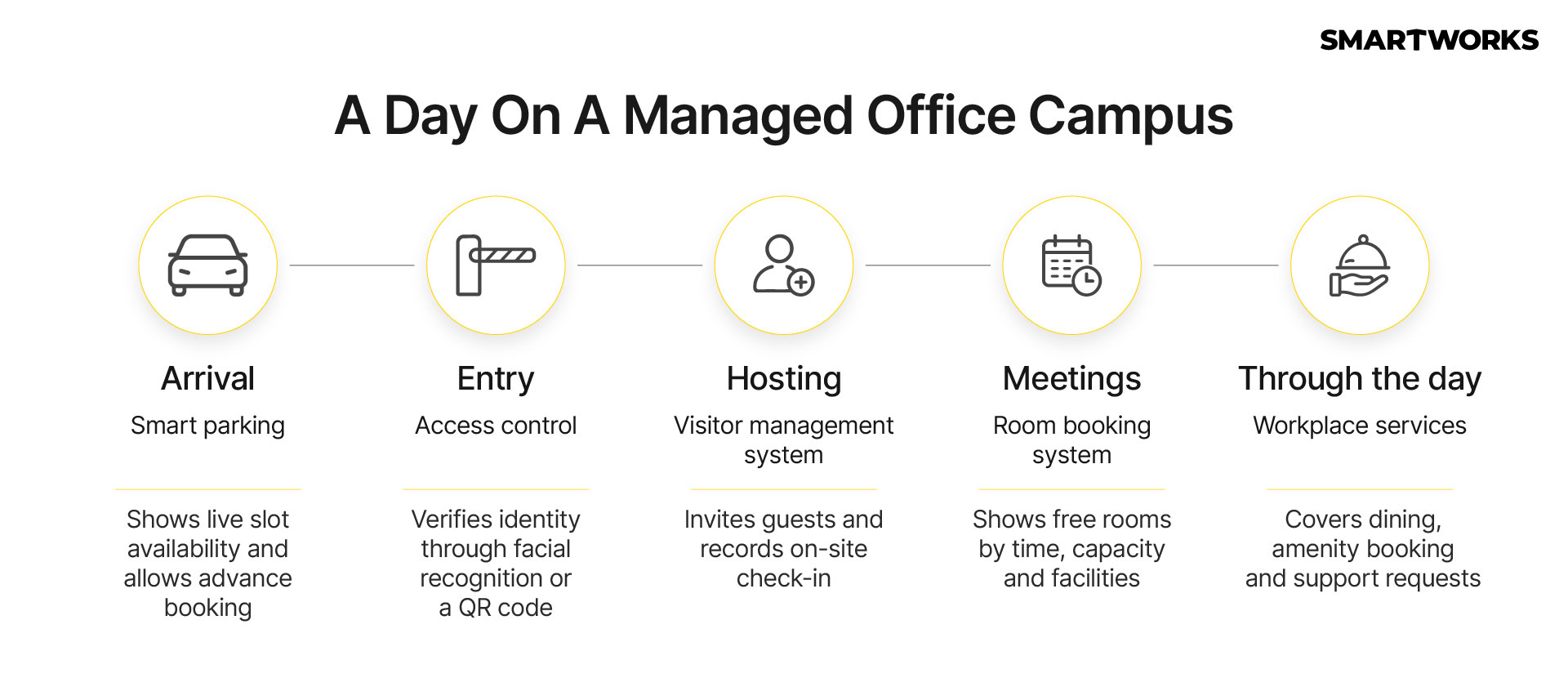
- Smart office technology connects the whole workday, from parking and entry to meetings and lunch, so employees use one app instead of several separate tools.
- Facial recognition or QR code access gives each employee one credential for every entry point, including the gym and parking. A smart visitor management system sends guests an invite before they arrive and checks them in digitally on site.
- Live booking for meeting rooms and parking lets teams plan before they arrive. The employer approves every user, so access matches the company’s own records as people join or leave.
As GCCs and multinational teams expand across India, the office is judged on how well it runs as much as on where it sits. Entry, guest management, room availability and on-site services shape the working day as closely as the floor plate does.
Arrival: How Smart Parking Systems Work
Parking is the first touchpoint of the day for many employees, and in dense business districts it sets the tone for what follows.
Smart parking systems show real-time slot availability, usually by vehicle type, and let employees reserve a slot before they set out. Checking in on arrival confirms if the slot is in use, which keeps availability accurate for everyone else.
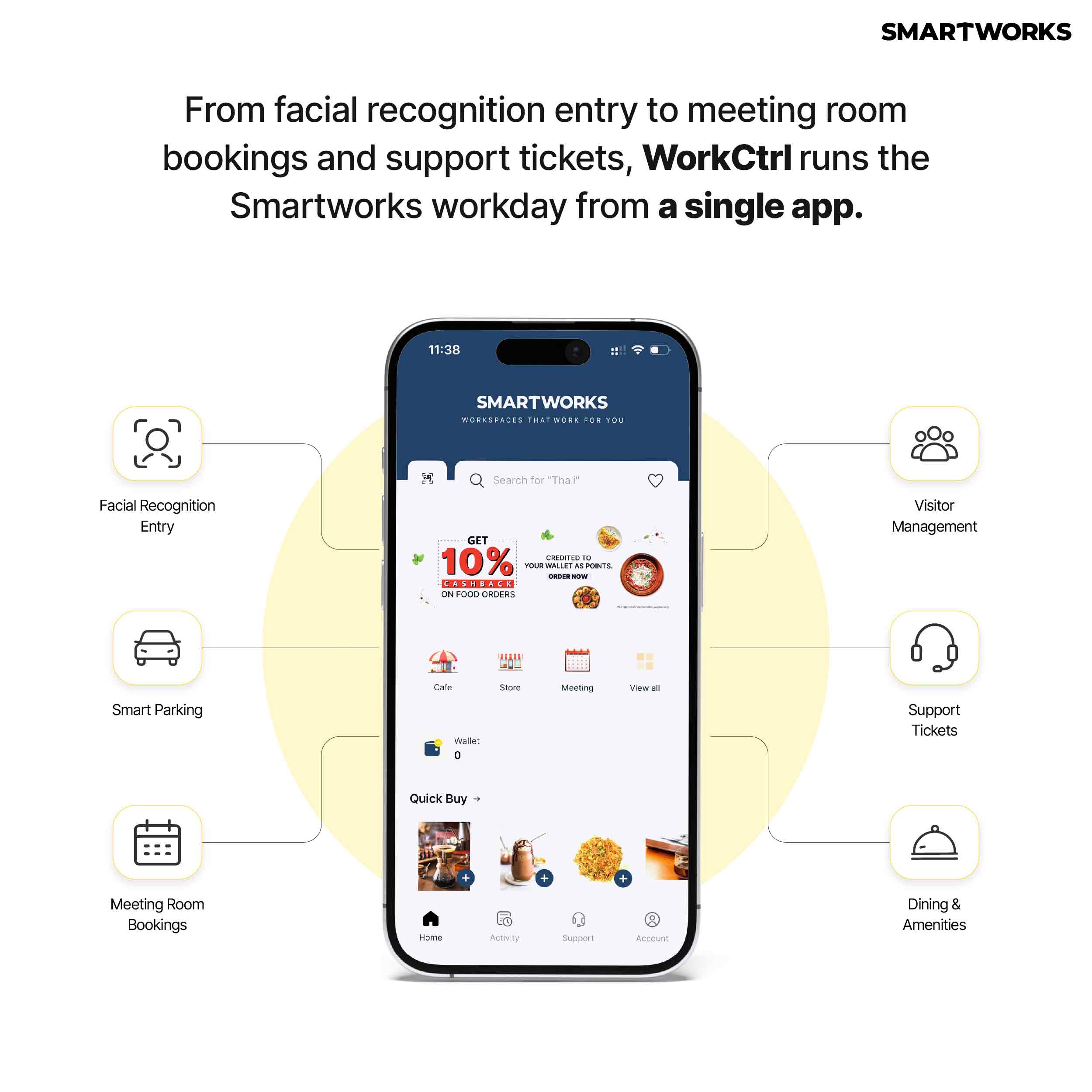
At Smartworks campuses, WorkCtrl shows live availability for cars and two-wheelers, and employees book and check in to a slot through the app.
Entry: Access Control System for Offices with Facial Recognition and QR Codes
Over the past few years, office entry has moved from keys and swipe cards towards touch-free credentials.
Facial recognition uses a face registered in advance as the credential at each entry point. The second method is QR code entry. It works by scanning a code displayed at the door, which grants contactless access.
When evaluating an access control system for the office, two features are worth prioritizing. The first is a single credential that works across every access point on campus, beyond the main door. The second is a clear alternative for employees who prefer not to register biometric data.
At Smartworks, employees can use either method, and the same credential carries across the gym, recreational zones and parking.
Guests: How a Smart Visitor Management System Works
A smart visitor management system replaces the paper register at reception with a digital process that begins before the guest arrives. Most systems follow a similar sequence.
- The host registers the visit, with its date, time, location and purpose.
- The system sends the guest an invitation.
- On arrival, the guest checks in on-site with basic details.
- The host tracks the visit through the system.
For companies assessing a visitor management system for the office, two questions are useful. Does every category of guest, from clients to vendors and event attendees, follow the same check-in? And can hosts see their visitors without depending on reception?
At Smartworks, hosts create invites through the Invite Guest feature on WorkCtrl, the invitation is sent to the guest on the host's behalf, and every visitor, vendor and event guest checks in on the premises.
Meetings: What a Meeting Room Booking System Should Do
Meeting rooms are among the most used spaces in any office, particularly on days when hybrid teams are in together. A meeting room booking system shows which rooms are free for a given slot and what each one offers, so teams can choose the right space in advance. The most useful systems let users:
- see every room available for a chosen time
- compare rooms by capacity and facilities
- invite attendees directly from the booking
- view, change or cancel upcoming meetings in one place
For companies with teams in several cities, booking across locations from a single interface matters as much as booking within one building.
On WorkCtrl, rooms are booked in three taps and compared by capacity, facilities and hourly rate. Booking works pan-India, across Smartworks locations, and showing the hourly rate at the point of booking helps teams plan room use against their budgets.
Through the Day: Workplace Services in a Single App
A growing share of office technology now supports the services around work. Bringing them into one app reduces the number of tools employees need and gives facilities teams a single channel for requests. On WorkCtrl, these services sit alongside access and bookings.
Dining is the most visible example. Orders from several café vendors go into a single cart and are tracked from Preparing to Ready, and Smart Store items, from snacks to healthier options, can join the same order. Payment draws on a wallet that is recharged once and used for instant checkout.
The same app handles bookings for table tennis, badminton, gym and yoga sessions, and the creche. Support requests are raised as tickets by category, from air conditioning to parking, and tracked until they are closed.
User Approval: Who Can Enter the Office
For GCCs and multinational teams, deciding who can enter matters as much as how they enter. When the employer approves each user, access stays aligned with the company's own records as people join, move or leave.
At Smartworks, every new WorkCtrl user is approved by the client company's point of contact before they can use the app or enter the campus.
The flow runs in four stages. The employee registers on the app, the client's point of contact approves the request on the Client Portal, an approval email reaches the employee's official inbox, and access is activated for both the app and campus entry.
Smart Office Solutions: What to Look For
Taken together, these systems shape how a workday begins and how smoothly it runs. The strongest setups share a few traits: one credential across the campus, guest check-in that starts before arrival, live visibility of rooms and parking, and access decisions that rest with the employer. Each system works best when it connects to the others through one app, so employees move through a single workday rather than a set of separate tools.
For companies setting up or expanding in India, these capabilities are worth evaluating alongside location and layout. Smartworks, India's largest managed office platform, operates 63 campuses across 15 cities, with WorkCtrl available to members as part of the workspace.
Frequently Asked Questions
A smart office uses connected technology to run the workday, from parking and entry to meeting rooms, dining and support. Employees use one app for access and bookings, and facilities teams get live visibility of how the space is used.
A smart visitor management system replaces the paper register with a digital process. The host registers the visit in advance, the guest receives an invitation, and the guest checks in on-site with basic details. Every visitor follows the same check-in, and hosts can see who is on the premises.
Facial recognition access control uses a face registered in advance as the employee’s credential. At each entry point, the system matches the employee’s face to that record and grants touch-free access, without a card or key.
No. Facial recognition is optional at Smartworks, and employees can opt out at any time. QR code entry is available instead, and the same credential works across the gym, recreational zones and parking.
A meeting room booking system shows which rooms are free for a chosen time slot. Users compare rooms by capacity and facilities, invite attendees from the booking, and manage upcoming meetings in one place. On WorkCtrl, rooms can be booked across Smartworks locations pan-India.
WorkCtrl is the Smartworks member app for campus access, dining, meeting room and parking bookings, and support tickets. It is available on the App Store and Google Play to members working from Smartworks centres.